Your rhythm, your way
Morning protocols, evening protocols, energy tracking. Your root system fits into your life, not the other way around.
This module's pack
Module 3 pack: your daily rhythm and content engine
This module's rhythm and content skills, ready to drop into your system.
See what's inside (19 files)
Skills (15)
/build-your-voice · /content · /content-analysis · /content-recycle · /content-vault · /content-week · /queue · /schedule · /morning · /evening · /save-session · /review · /weekly-planning · /tarot-reading · /voice-gate
Voice files (2)
Your voice rubric template and corpus guide, filled in when you run /build-your-voice
Build guides (1)
Step-by-step, one per piece: Daily protocols. Plus the pack README that installs it all.
Unzipped it and something looks missing?
Your skills install into a folder named .claude. It starts with a dot, so your Mac or PC hides it by default. Nothing is missing. To show hidden files on Mac, press Command + Shift + . (period) in Finder. On Windows, open View → Show → Hidden items in File Explorer.
Start here: this module is about your life, not just your AI
Before a single protocol or automation, one question decides whether the rest is worth building: what do you actually want your days to feel like? Watch this first, then build the rhythm around your answer.
👇 After this module
Your morning and evening protocols are running. Your energy is tracked. Your content rhythm is set. Your root system knows how you work.
What you'll do in this module
- Morning and evening protocols, set up the two daily rituals that hold the system together
- Energy and cycle tracking, tell your system what to track about your body and watch the patterns appear
- The Four Languages check-in, the two-minute daily practice that keeps Soul, Mind, Heart, and Body visible
- The four layers of your root system, understand memory, rules, skills, and hooks and when to use each one
- Hooks: gates Claude cannot bypass, automatic quality checks that run without you asking
- Put it into practice, create your own rules, skills, and hooks
- Your content rhythm, drop in your best existing posts and let Claude find your voice and pillars
What you'll leave with
- Morning and evening protocols running every day
- Your energy, cycle, and Four Languages check-in tracked automatically
- A content rhythm with your voice profile and pillars defined
- A clear understanding of when to use memory, rules, skills, or hooks
- At least one custom rule and one custom skill of your own
- Your voice gate hook installed and catching violations automatically
- The data behind your Rhythm and Inspiration tabs, ready for the dashboard you build in Module 4
Why this matters
Your system has to fit your real days, not the productivity fantasy of them. In this module it learns the shape of your actual rhythm.
Start here
Lesson 1: Morning and evening protocols →
Morning and evening protocols 🌅
A protocol is a sequence of steps your root system runs when you say a specific phrase. You design it once. It runs the same way every time. No willpower required, no forgetting steps.
Your morning protocol activates when you say "good morning" to your root system. It checks your calendar, reviews yesterday's notes, sets today's priorities, and checks in on your energy. All of this happens in the first two minutes of your work day, before you open a single tab or check your inbox.
Your evening protocol activates when you say "wrapping up." It logs what you accomplished, rates your energy for the day, captures any learnings worth keeping, and sets tomorrow's intention. This is how nothing falls through the cracks. Every day closes cleanly.
Watch: the two bookends, live
Here is the whole rhythm in one pass: how the morning protocol opens your day and creates the daily log everything else saves into, and how the evening protocol closes it cleanly. The rest of this lesson breaks down each piece.
What a morning check-in looks like
root system: Reading your logs, calendar, and open items...
Good morning. Here is where you're standing.
- Yesterday: sales page draft finished, 2 emails sent
- Today: client call 10am, content block 2-4pm
- Still open: follow up with Sarah, review last week's numbers
Four check-ins before we plan:
Soul - how are you arriving? Grounded, restless, foggy?
Body - energy 1 to 10, and how did you sleep?
Heart - who are you reaching out to today?
Mind - clear or scattered? What is loudest?
you: soul grounded, body 7 slept well, I'll message Sarah,
mind clear - the launch is what is loud
root system: Good. Today, by language:
Mind - call prep at 9:30, newsletter draft in the 2pm block
Heart - message Sarah
Body - walk before you sit down to write
Soul - ten minutes, no screen, before you start
Written to your daily log and task list. Ready when you are.
You design these once. Your root system runs them every day. They become your rhythm.
Watch: your system pushes back
One person building with me describes how her trained system keeps circling back to her original goals when she gets distracted by new ideas. The system holds you accountable in a way no untrained model can.
Your morning protocol is already built
Your starter system includes a morning protocol. To run it, open Claude Code in your project folder and type:
Claude loads the protocol and walks you through every step: soul, body, heart, mind, day plan. You answer in plain language. You do this every day. It is your daily rhythm.
Your evening protocol works the same way
When you are done for the day, open Claude Code and type:
Claude reflects on the day with you, logs what you accomplished, rates your energy, captures learnings, and saves everything to your daily log. Every day closes cleanly.
These protocols are yours to customize over time. Want a gratitude prompt in the morning? Tell Claude to add one. Prefer to check your calendar yourself? Tell Claude to skip that step. The protocol file lives at .claude/commands/morning.md and you can edit it directly or just ask Claude to change it for you in plain language.
How memory stays clean
In Module 2, you learned that nothing expires automatically. Claude has no internal timer. Memory stays clean because two commands work together: /save-session writes everything as you go, and /review walks every layer when you choose to clean up.
/save-session (every working session)
Pattern scan, session learnings, daily log update, fact drift check, file health check. Runs automatically. Receipt at the end shows what landed and what skipped. Triggered by saying "save session" or by /morning and /evening if you use those protocols.
/review (when you choose)
Walks every layer in one pass. Patterns: mirrored back in neutral format, you confirm or dismiss. Learnings: keep, promote, or delete. Scratchpads: keep going or close out. Facts: still true? Run it daily, weekly, monthly, or when the save receipt flags large files. Your rhythm, your call.
Your only job when you run /review is to answer in plain language: keep, promote, delete, still true, drifted. Nothing gets deleted without your explicit approval.
From now on
Every time you start a session, say "good morning" (or type /morning). Every time you wrap up, say "wrapping up" (or type /evening). When you want to clean up memory, type /review. These phrases are the triggers. Claude runs the full protocol.
The weekly one: planning
Morning and evening are your daily bookends. There is one more cadence, and it runs once a week. The important part: work is only a quarter of it. You look back at last week across all four languages, notice what got your attention and what got skipped, then choose your three most important actions for the week ahead and make real commitments in Soul, Heart, and Body alongside Mind. That is what gives the week a spine.
Plan your week
Run it when your week begins, Sunday evening or Monday morning, whichever fits you. Claude reads your last seven daily logs, walks you through each of the four languages, asks what worked and what you noticed, and caps you at three actions on purpose, because more than a handful is a trap. It writes the week to your task store with real dates.
Energy and cycle tracking 💪
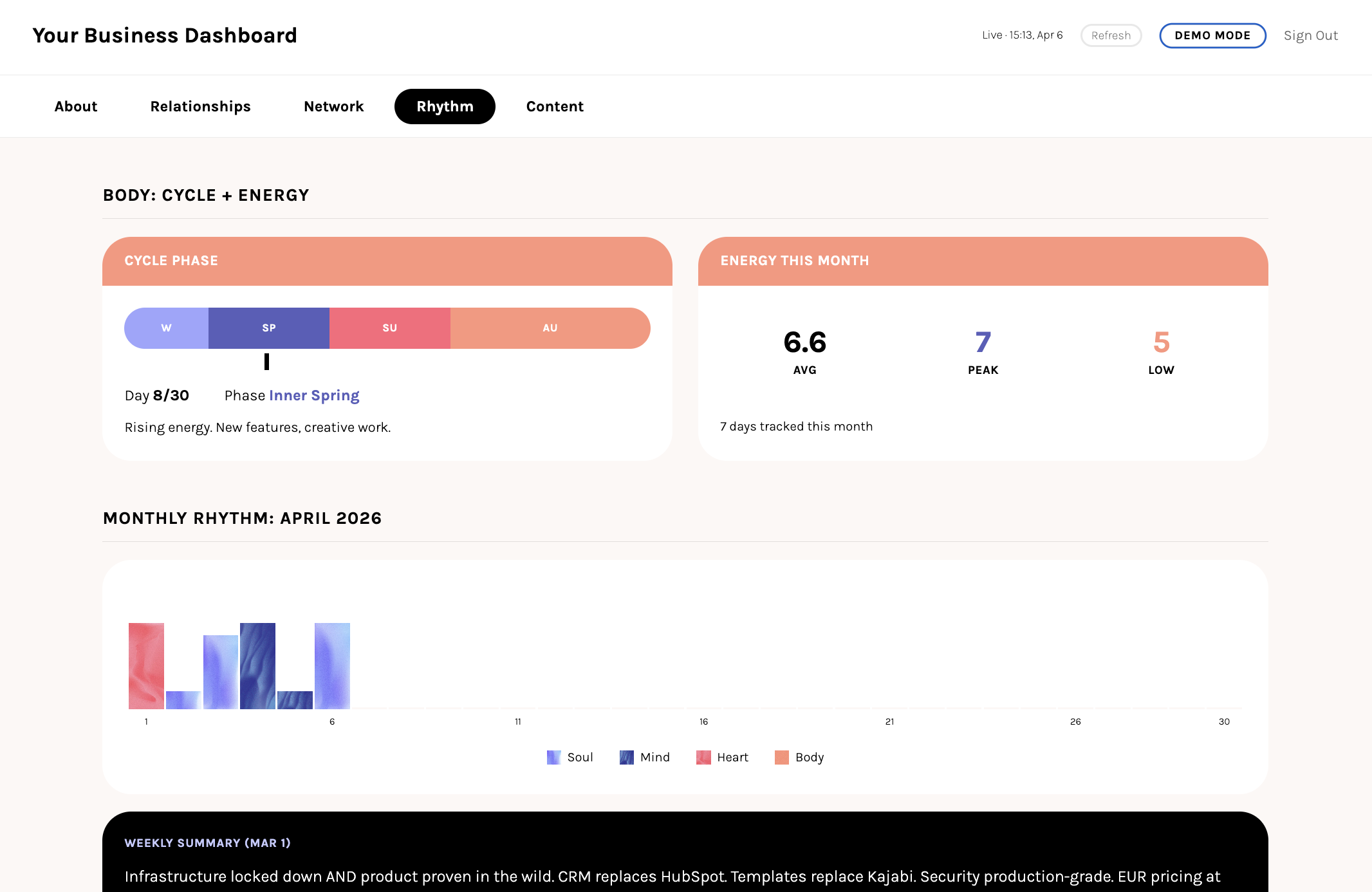
Your root system can track anything you want to measure about your day. Energy on a scale of 1 to 10. Sleep quality. Whether you moved your body. How focused you felt. Your mood. This is the Body dimension of the Four Languages, and it is one of the most powerful parts of the system.
To set it up, you simply tell your root system what to track. That is it. No apps, no spreadsheets, no habit trackers with notification overload.
Tell your root system what matters
Also track whether I moved my body.
root system: Done. Every morning I will ask:
- Energy (1-10)
- Sleep quality (1-10)
- Movement (yes/no, what type)
I will log these to your daily file.
Your root system logs this data to your daily files. Over time, you start seeing patterns. Which days you have more energy. What affects your focus. Whether sleep quality correlates with productive days. Whether skipping movement shows up as lower energy two days later.
For those who want it, your root system can also track your cycle. This is completely optional. If it is relevant to you, it becomes another data point that helps you plan your weeks with more awareness.
You choose what to track. Start with one thing. Add more when it feels right. The goal is not to measure everything. The goal is to notice patterns you would otherwise miss.
From the live session: track your body, plan around your rhythm
This is the part that changes how you plan. When your system knows your energy, sleep, and cycle, you stop forcing the same output every day and start working with your real rhythm instead.
How to set it up
Open Claude Code in your project folder and tell it what you want to track. There is no special command. Just say it in plain language:
whether I moved my body every day. Add these to my
morning check-in.
Claude will update your morning protocol to include these questions. It writes the tracking data to your daily log file automatically. You never have to open a spreadsheet.
The Four Languages check-in 🌱
The daily check-in is four questions, one for each language. It takes about two minutes. It keeps all four dimensions visible so none of them get quietly neglected.
From the live session: why wellbeing is built in
The reason the four languages live inside your morning protocol and not in a separate app: your system is an opt-out for balance, not an opt-in. On the days you forget to plan for the heart, body, or soul, it asks anyway.
SOUL
How is your soul this morning? Connected, restless, quiet?
or: Did you do your reflective practice?
BODY
How is your body today? Energy 1 to 10?
or: Sleep, tension, movement planned?
HEART
What emotions are present? Who are you connecting with today?
or: One thing today that isn't work?
MIND
Thoughts clear or scattered? What's on your mind today?
or: What are you working on?
Your root system asks these questions as part of your morning or evening protocol. You answer in plain language. "Energy is a 6, slept okay, going for a walk later." "Working on the sales page, need to email Sarah back." That is all it takes.
From the live session: a check-in habit, four months in
Maren records each dream as a voice note, then drops the transcript into her morning check-in. Four months later: 46 nights logged, 90+ dream segments, 80+ personal symbols, 25+ themes tracked. A two-minute daily habit compounds.
Over time, this daily check-in reveals something powerful: which languages get your attention and which get neglected. If you notice you always have a strong Mind answer but your Heart answer is "nothing this week," that is information. Not a judgment. Just something to notice.
Listen: guided Four Languages practice (12 min)
Close your eyes. Walk through each language one at a time. Body, Heart, Mind, Soul. Ask each one what it needs. Thank it. Let it sit down. Then welcome them all back. This is what the check-in feels like when you slow down enough to actually feel it.
The check-in is not a test. There are no right answers. It is a mirror that keeps all four parts of your life visible, even on busy days when it would be easy to let some of them disappear.
Next LessonYour content rhythm ✍️
You have your morning and evening protocols. You are tracking your energy. Now add the third rhythm: content. A simple, repeatable weekly rhythm for making and publishing content that sounds like you, rather than a content strategy deck or a 90-day editorial calendar.
From the live session: a rhythm for content in three moves
Before the steps below, here is the shape of it. Vault the idea the moment it lands, queue it into a draft when you have a minute, schedule it when it is ready. Out of sight, never lost, and never idea-to-published in one panicked sitting.
Start with your voice
Before you write a single post, teach your system how you actually sound. Run /build-your-voice once. It reads your real writing, the posts and emails that already sound like you, and builds two files that live in your system from then on.
It builds two files, and it is worth understanding why there are two:
Your voice rubric is the checker. Your rules: the words you never use, the moves that are not you, what your best writing does when it lands. It describes how you sound.
Your voice corpus is the source. Three to eight of your real pieces per register, kept word for word, typos and all. It is how you sound.
A rules file on its own gets you writing that follows your rules and still reads like a competent stranger who skimmed a summary of you. The corpus is what makes a draft sound like you wrote it, because the system imitates your real sentences instead of a generic idea of good copy. The rubric then catches it when it drifts. You need both, which is why a single tone-of-voice document was never quite enough on its own.
Set up your voice
Paste in your best real posts and a few emails you actually sent. It shows you the rubric before it saves anything, you sharpen it, and your voice files are done. Run it once, then you write content instead of setting up voice.
Step 1: See what you already have
Voice is how you sound. The next question is what you keep coming back to. Feed your existing content into your system: blog posts, newsletters, the social posts you are proud of. Your root system reads through everything and surfaces the themes you return to, so you are working from your own back catalogue instead of a blank page.
Read your back catalogue
Point it at whatever you have. A folder of posts, a newsletter archive, screenshots of your best work. It clusters what worked and hands you the themes to build your pillars from.
Step 2: Write with your engine
Now you have your voice files and your themes. /content is the one engine that uses them. Ask it for a post, an email, a newsletter, or a caption, and it reads your rubric and the matching corpus before the first word, writes from your real sentences, then critiques and scores the draft against your voice before you ever see it. What reaches you needs the least editing, and you are still the one who decides it ships.
One command does four jobs. It drafts a post in your voice, checks a draft you paste in and scores how much it sounds like you, sharpens a piece you already have, and sweeps a whole folder for slips before you publish. Whichever job you have that day, it is the same command.
Write or check anything
Every draft comes back with a short receipt: which register it used, which of your pieces it built from, and a voice score out of ten. Your edits teach it, so it gets sharper the more you use it.
Teaching your system how you sound and enforcing it are two different jobs. /content is the careful writer that gets a draft to near-final. The voice gate hook you set up in the Hooks lesson is the fast mechanical layer underneath it, scanning everything Claude writes to your public pages for banned phrases and slips the moment they land. The engine gets the quality right; the hook makes sure nothing off-voice slips through.
Step 3: Find your content pillars
Content pillars are the 3 to 5 themes you always come back to. Your content analysis already surfaced them. Now you make them explicit.
Your setup prompt
content pillars? The themes I keep returning to.
Give me 3 to 5 pillars and save them to my system.
Your pillars are a starting point, not a cage. When you sit down to create and do not know what to write about, they give you a direction. When you have too many ideas, they help you filter.
Step 4: Plan your week
Once a week, usually on a Monday, you stage the whole week's content in one pass. How many posts, which platforms, and which day each one goes out. A weekly rhythm your root system helps you hold, rather than a spreadsheet you fill in once and forget.
Stage the week
It reads your week, drafts each post through /content so everything is already in your voice, and lines the week up in one place for your approval. It ends on one question: schedule these now, or leave them staged. Start small. Two posts a week beats five posts one week and silence the next.
Step 5: Start your content vault
Ideas do not arrive on schedule. They come during walks, in the shower, at 2am. Your content vault catches them all so nothing gets lost.
Save ideas as they come
The half-thought on a walk, the line you catch in the shower. Your vault collects them, so when it is time to create you never start from zero.
Step 6: Vault, queue, schedule
The vault catches the idea. Two more commands carry it to published, so you never go from idea to post in one panicked sitting. /queue turns a vaulted idea into a draft in the pipeline when you have a spare minute. /schedule sends a finished draft out when it is ready.
Part 1 gives you the vault, and it saves straight to markdown, fully local. Queue and schedule come fully online once you build your backend, taught step by step in Module 8. Run them today and they explain what they still need and stop safely; nothing breaks.
Move an idea down the pipeline
/schedule
Vault to queue to schedule. Three small moves instead of one big one, and nothing you thought of ever disappears.
Fit it into your morning rhythm
One last piece, and it lives inside the protocols you built earlier this module. Teach your morning check-in which days you post, so it reminds you at the right moment and you stop holding it in your head. You do not need a separate skill for this. Tell Claude your rhythm in plain words: which days you post and where, when you plan the week, and when you rest. Then ask it to add a content line to your morning protocol.
Add content to your morning check-in
Mondays, and rest on weekends. Add a content check to my
morning protocol so it reminds me at the right time.
From then on, "you have a post going out tomorrow, is it ready?" shows up in your morning check-in on its own. Write the day before a post day: post Tuesday and Friday, and Monday writes Tuesday's, Thursday writes Friday's.
This feeds your Inspiration tab
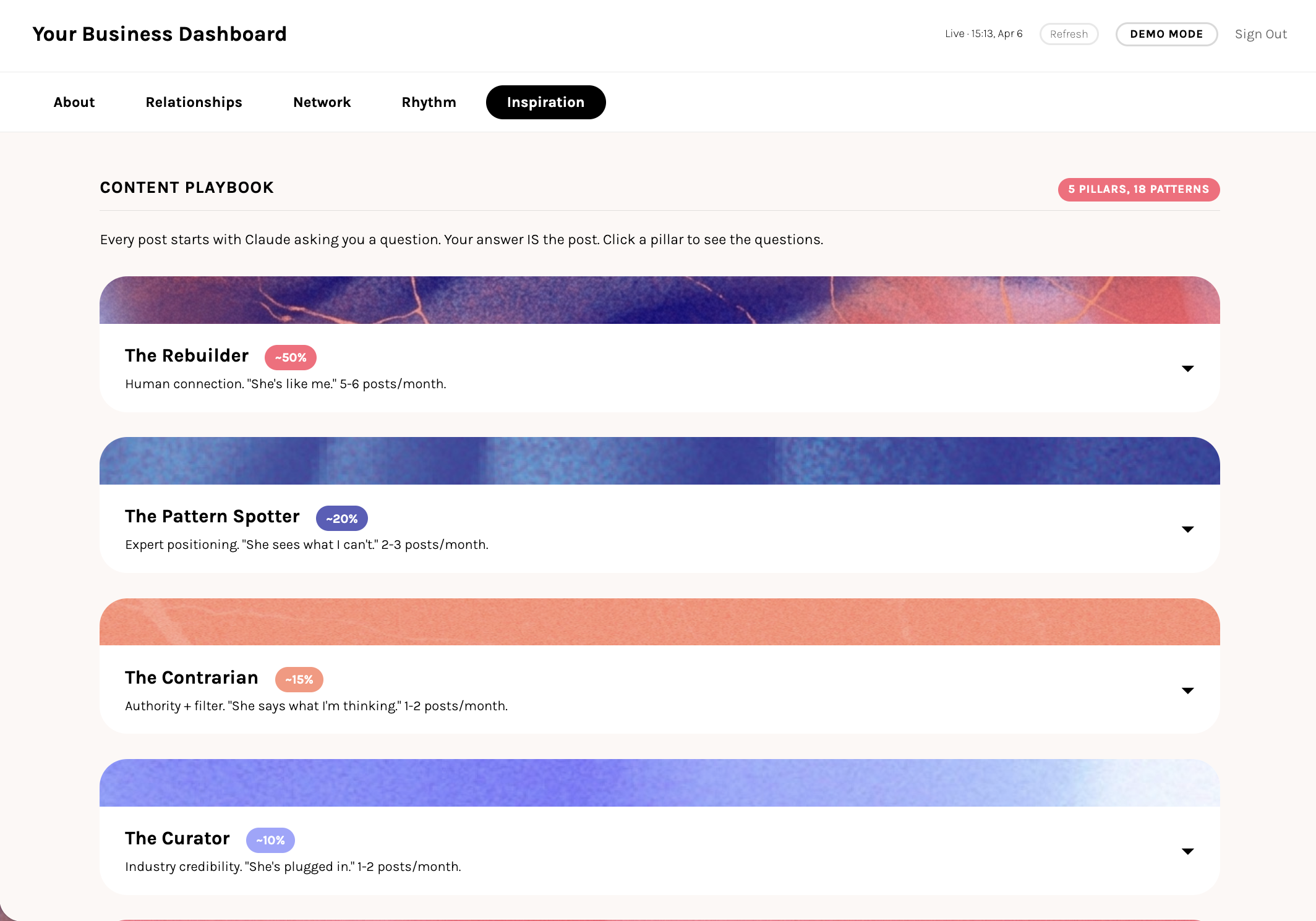
Your content patterns, voice profile, pillars, and saved ideas are the data behind the Inspiration tab. You build the dashboard itself in Module 4; once it is up, this is where your system shows you what you have to work with whenever you sit down to create.
The weekly content rhythm
Monday: check your content calendar and vault for the week. Mid-week: create from your pillars, using your voice profile. Friday: review what you published, save what worked. Treat it as a rhythm and adjust it until it fits your energy and your life.
Also in your pack
One more content skill ships alongside the engine. You do not need it on day one; reach for it when the work calls for it.
/content-recycle turn one strong piece into several across formats, each one still routed through /content so it stays in your voice.And one Soul tool rides along: /tarot-reading, a reflective prompt for when you want to step back from the doing. Nothing to set up; run it when you want it.
The four layers of your root system 🪴
You have been building with several different types of files without necessarily knowing how they relate to each other. Your root file from Module 1. Your fact files and memory system from Module 2. The skills you have been running all module. They are all doing different jobs.
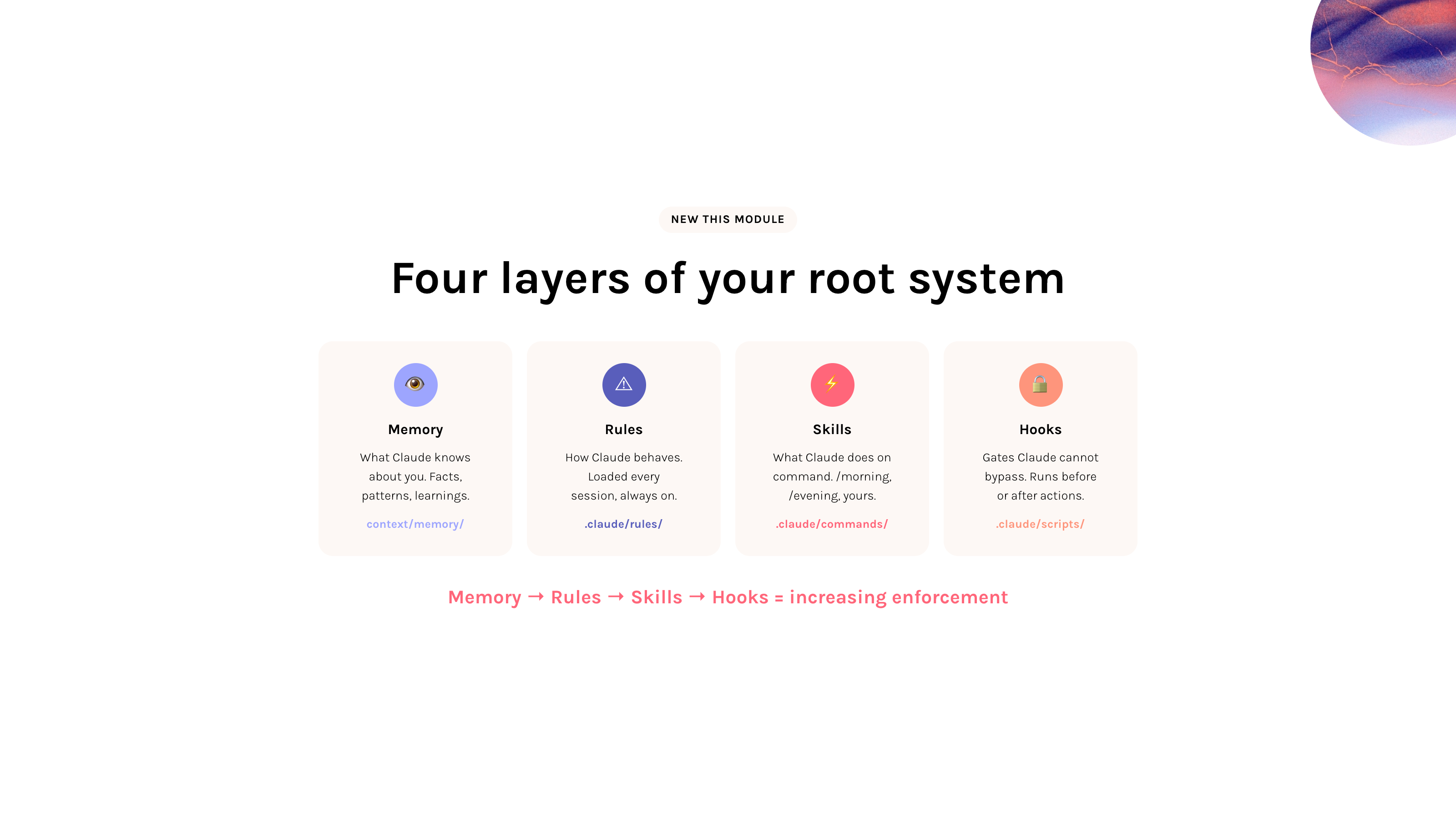
Your root system has four layers. Each one solves a different problem, and knowing which one to reach for saves you from building the wrong thing for the situation.
Layer 1: Memory (you already know this)
In Module 2, you built your memory system: fact files, patterns, learnings. Memory tells Claude what is true about you, your business, your preferences, your history. It persists across sessions. Claude reads it for context.
Memory is informational. It tells Claude what is true. It does not tell Claude what to do. Think about how your own memory works: you can know perfectly well that checking your phone first thing in the morning ruins your focus, and still do it anyway. Knowing something and acting on it are different capacities. Claude's memory works the same way. It can remember every preference and every lesson from past sessions, and still not follow them in the moment.
context/memory/ (fact files, patterns.md, learnings.md)Layer 2: Rules
Rules are instructions Claude reads at the start of every session. They shape how Claude behaves across everything: what tone to use, what to avoid, what to check before acting. Your starter system came with rules like the absolutes (hard behavioral boundaries) and the voice gate (writing style enforcement).
Rules are always on. Claude loads every file in .claude/rules/ automatically. You do not need to trigger them or ask for them.
.claude/rules/ (absolutes.md, voice-gate.md, security.md, and any you create)Layer 3: Skills
Skills are step-by-step procedures Claude follows when you type a command. You have been using them all module: /morning, /evening, /content. Skills are loaded on demand, only when you call them.
.claude/commands/ (morning.md, evening.md, content-week.md, and any you create)Layer 4: Hooks
Hooks are shell scripts that run automatically before or after Claude takes an action. Claude does not control them, cannot skip them, and cannot override them. The system runs them.
A hook can warn Claude ("you just wrote an em dash, fix it") or block an action entirely ("this email contains banned phrases, it will not send").
.claude/scripts/ (voice-gate.sh, and any you create) + configured in .claude/settings.local.jsonThe key difference: trust level
Memory, rules, and skills all depend on Claude choosing to follow them. Claude can forget a rule. Claude can skip a step in a skill. Claude can miss a fact in memory. These tools work most of the time, but they rely on attention.
A hook does not rely on attention. It runs at the system level. If a hook says "block this," the action is blocked. Period.
From the live session: the four layers and the enforcement ladder
The same four layers in order, with the idea that ties them together: enforcement rises as you go. Memory just exists, rules can be broken, skills are solid when you call them, and a hook is the only one Claude cannot get around.
When to use what
Most things are rules or skills
You will spend most of your time writing rules and skills. Memory you built in Module 2. Hooks are for later, when you find something that rules alone cannot catch. The next two lessons go deeper on each.
Watch: leave some things out
Your system does not need to hold everything. Some things are better left outside. Knowing what belongs in each layer also means knowing when something does not belong in any of them.
Hooks: gates Claude cannot bypass 🛡️
Rules depend on Claude paying attention. Most of the time that works. But when a mistake would be visible to a client, a customer, or the public, "most of the time" is not good enough.
Hooks solve this. They are shell scripts that run automatically, at the system level, outside Claude's control. Claude cannot skip them, forget them, or override them.
A real example
Your starter system includes a rule that says "no em dashes in public content." That rule lives in .claude/rules/ and Claude reads it every session.
In one session, Claude wrote 38 em dashes across an entire website despite the rule being loaded. The rule was there. Claude just did not follow it.
The fix was a hook. The voice-gate.sh script runs automatically after every file edit. It scans for em dashes, banned phrases, and AI-sounding language. If it finds violations, it warns Claude immediately, in the same response, so the fix happens before moving on.
Two types of hooks
WARNING HOOKS
Run after an action (PostToolUse). Scan the result. If something is wrong, inject a warning that Claude sees in the next response. The action already happened, but Claude can fix it immediately.
Example: voice-gate.sh warns after editing a website page.
BLOCKING HOOKS
Run before an action (PreToolUse). Scan what Claude is about to do. If something is wrong, block the action entirely. It never executes.
Example: an email gate that blocks sends containing banned phrases.
How hooks work
A hook is a small script file in .claude/scripts/. You connect it to an event in .claude/settings.local.json. The event tells the system when to run the script. The script tells the system what to check.
You do not need to write the script yourself. Describe what you want to catch, and Claude will write the script and configure the settings file for you.
When to create a hook
Most of the time, a rule is enough. Hooks are for the situations where "Claude forgot" is not an acceptable answer. Three questions:
If all three are true, write a hook. If not, a rule is probably fine.
Next LessonPut it into practice 🛠️
You now understand the four layers: memory, rules, skills, and hooks. This lesson is where you create your own. Work through each section at your own pace.
Create a custom rule
A rule is a markdown file in .claude/rules/. Claude loads every file in that folder at the start of every session. You do not need to reference them or ask Claude to read them. They are always active.
What a rule file looks like
When writing any client-facing content:
- Use "we" instead of "I"
- Keep paragraphs to 2 sentences max
- No exclamation marks
- No emojis in headers
- Always end emails with "Best, [name]"
That is a complete rule file. Save it as .claude/rules/brand-voice.md and Claude follows these instructions in every session, across every task.
Good rules vs bad rules
GOOD RULES
Short and specific
One topic per file
Clear "do this" or "never do this"
Universal (applies to every session)
Easy to verify (can you grep for it?)
AVOID
Long explanations (put those in skills)
Step-by-step procedures (that is a skill)
Facts about you (that is memory)
Things that only apply sometimes
Duplicating what is already in CLAUDE.md
Your setup prompt
Create a custom skill
A skill is a markdown file in .claude/commands/. The filename becomes the command name: weekly-review.md becomes /weekly-review. Skills are only loaded when you call them.
What a skill file looks like
## What this does
Review the past week across all four languages.
## Steps
1. Read the daily logs from the past 7 days
2. Summarize what happened in each language
3. Flag anything that got neglected
4. Ask me what I want to focus on next week
5. Save the review to context/history/
Think about something you do repeatedly. Something where you find yourself explaining the same thing to Claude every time. That is a skill waiting to be written.
Your setup prompt
Modifying existing skills
Your starter system came with skills that were built for a general user. You are meant to change them.
How to modify a skill
Install the voice gate hook
Your starter system includes a voice gate. Run /voice-gate in Claude Code and it installs the hook for you. From then on it runs automatically after every file edit and catches voice violations before they reach production. To read what it catches, open .claude/commands/voice-gate.md; to tune it, edit the patterns in .claude/scripts/voice-gate.sh or add your own banned words in heart/content-hub/voice-guide.md.
Confirm it fired
A hook you cannot see working is a hook you do not trust. Test it: ask Claude to write an em dash into a throwaway file, for example "add a line with an em dash to test.md". The voice gate should flag it immediately, in the same response, before you move on. If it does, your hook is live. If nothing happens, it is not wired up: run /voice-gate again, or ask Claude to check the hook in .claude/settings.local.json.
Create your own hook
You can check your active hooks anytime by typing /hooks in the prompt.
One principle for all of this: keep only what works
When you update a rule, skill, or hook, delete the old version. Do not keep both. Do not add "v2" sections. One method per task. If the new way works, the old way is gone.
If a rule feels too strict, change it. If a skill feels clunky, rewrite it. If you keep doing something manually, make it a skill. If a rule keeps getting broken, upgrade it to a hook. When you want to write a brand-new skill from scratch, ask Claude to walk you through it; Module 8 goes deep on building your own.
/voice-gate in Claude Code. See how it catches violations automatically.